

Use the troubleshooting below for the following issues with Firmware Updates to DOF Reality Control Boxes
- Unable to connect to the DOF Reality Control Box
- Motion works strangely in games in 10 and 12-bit modes
- Unable to advance past Com Connect
- Firmware update froze during the installation
Unable to connect to the DOF Reality Control Box
If you are experiencing issues connecting to your DOF Reality Control Box after recently attempting a firmware update, please try the following steps:
- Download https://dofreality.com/tools.zip
- Unzip the tools into a folder on your computer
- Connect and press Full info
- Advise DOF Reality Technical Support of the information on the screen: Contact DOF Reality Technical Support
- If you are unable to connect to the DOF Reality Control Box, open the Windows Device Manager and see if you’re getting a COM port or HID device when you plug in the DOF Reality Control Box to a USB port.
Motion works strangely in games in 10 and 12-bit modes
If motion works, but performs, but performs strangely in games and in 10 and 12-bit modes, please try the following steps:
- Test motion in other games to verify it is not an issue with the motion profile in Sim Racing Studio.
- If motion feels fine in other games, please use SRS motion tuning article to adjust your motion profile.
- When you go to SRS -> Setup -> Motion Test and move each axis gradually, does it move correctly?
- If not, try the steps below:
- Close the SRS app
- Set proper settings for SMC (as per Chapter 5.4 in the Instruction Manual for your platform) and open it
- Instruction Manuals for DOF Reality platforms can be found here: https://dofreality.com/instructions-manuals/
- Set it to UDP
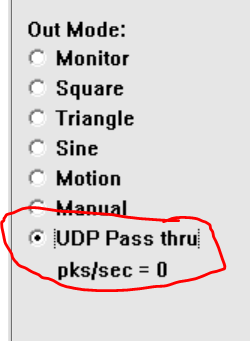
- Open SRS – it won’t show the connected motion box – that’s okay
- Go to the telemetry page of SRS and set it to ON
- Run your game etc
- Check and send the SMC charts for the motor(s) in question to DOF Reality Technical Support: Contact DOF Reality Technical Support
- The chart lines are mentioned here https://www.xsimulator.net/community/threads/smc3-arduino-3dof-motor-driver-and-windows-utilities.4957
Green is where the motor is, dark blue is where you want it to be via SRS.
- The chart lines are mentioned here https://www.xsimulator.net/community/threads/smc3-arduino-3dof-motor-driver-and-windows-utilities.4957
- Send DOF Reality Technical Support screenshots of SMC for that motor: Contact DOF Reality Technical Support
Unable to advance past Com Connect
When using the dofreality.com/tools/ (http://dofreality.com/tools/) firmware update, you are unable to advance past Com Connect when selecting the BLACKPILL_F401CC option and then select Connect (it says Paired)
- If you are using Chrome, ensure have you provided Chrome permissions to connect to COM port and HID devices
- Try a different web browser to test if you are still unable to advance
- If still unable to advance, open the DOF Reality Tools and press Connect and press Full info
- Advise DOF Reality Technical Support of the information on the screen: Contact DOF Reality Technical Support
Firmware update froze during the installation
- If the firmware update froze mid-install, try restarting the update.
- If the update is still not working, download the DOF Reality Tools from https://dofreality.com/tools.zip
- Open the DOF Reality Tools and press Connect and press Full info
- Advise DOF Reality Technical Support of the information on the screen: Contact DOF Reality Technical Support
